The technical requirements for a hybrid event start with a stable, dedicated internet connection: plan for at least 15 Mbps of upload speed for a 1080p broadcast, or 40 Mbps for 4K. Shared venue Wi-Fi isn’t a dependable substitute for a dedicated line, and a backup connection helps protect the stream. Audio also needs deliberate planning, including a broadcast mix that serves online viewers as well as sound reinforcement for the room.
It’s easy to focus on internet speed, but the right setup depends on what your audience will do. A panel discussion, audience questions and remote presentations each place different demands on sound, cameras, connectivity and technical support.
This guide explains how to plan internet capacity, audience-ready audio, rehearsals and on-the-day support. It also shows how to turn planned activities into the technical capabilities that make participation clear and engaging for people in the room and online.
Key Takeaways
- Match the event platform to the audience size and format, with clear ways for in-person and online attendees to participate.
- Plan a backup internet path, such as bonded 5G or a secondary fibre connection, so the production has a failover option.
- Schedule two technology tests, including a full venue run-through 48-72 hours before the event, and provide technical support for attendees.
- Start with the activity: panels, audience questions and remote guest interactions each call for specific camera, screen, lighting and moderation arrangements.
- Design sessions and interactions for both audiences, with virtual session lengths and breaks that help maintain attention.
1. Do I need a separate audio mix for my virtual and in-person audiences?
Yes. Plan separate audio mixes for the room and the broadcast. In-room speakers need sound reinforcement that suits the venue, while remote audiences need a clear feed without room echo or excessive background noise. According to EventMB, 67% of event organisers identified delivering an equal experience to in-person and remote audiences as their biggest hybrid-event challenge in 2024. Audio planning is central to closing that gap.
A sound operator can create a front-of-house mix for the venue and a dedicated broadcast mix for the stream. The room mix sends microphones and playback through the venue’s speakers. The broadcast mix balances those sources for online listeners, who hear the audio differently from people in the room. A presenter’s microphone may sound clear over speakers but thin or distant in the stream, so test both outputs separately.
Build the broadcast mix around what virtual attendees need to hear. For a panel, balance each panellist’s microphone and any remote guest audio, then reduce distracting room noise. When a remote speaker joins, manage their return audio carefully to avoid echo or feedback. Make sure audience questions reach the broadcast, not just people seated nearby. A roaming microphone and sound check can help uncover gaps in the audio path.
Choose event software based on audience size, session format and planned interaction. A presentation-led conference may need reliable streaming, registration and moderated Q&A. A workshop may also need breakout rooms, chat or polls. These features shape the hosting plan: assign someone to monitor virtual questions and relay relevant contributions to the presenter. Test the actual software workflow, including remote speaker audio, rather than relying on a feature list.
Coordinate both audiences with shared cues and visible moderation. Tell in-room attendees how to ask questions, while a moderator gathers online questions and brings them to the stage. Give the presenter a clear signal when a remote participant is ready to speak. This builds engagement into the run sheet instead of leaving it to improvisation during the session.
Match the audio plan to the event format during planning. A keynote needs clear speech and playback; a panel needs balanced microphones and well-managed speaker handovers. A hybrid workshop needs clear instructions for moving between the main room and breakout sessions. Before selecting equipment or configuring the platform, map each activity to its audio sources, operator and audience route.
Before the event, rehearse a complete audience interaction: play a presentation, take a question from the room, bring in a remote speaker, then return to the presenter. Listen to the room and broadcast outputs separately. This sequence can reveal gaps in routing and moderation before attendees arrive, and confirm that both audiences can follow the same conversation.
2. What is the minimum internet speed required for a high-quality hybrid event?
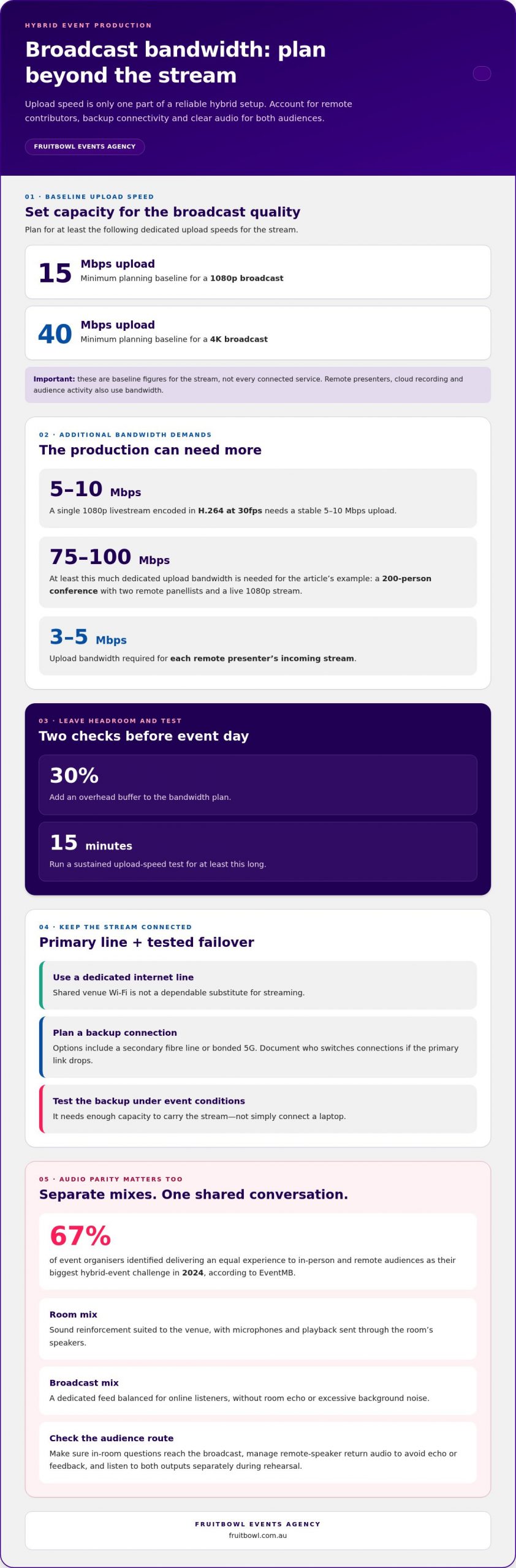
For a dedicated broadcast, plan for at least 15 Mbps upload for 1080p or 40 Mbps for 4K. These are baseline figures for the stream, not every connected service. Remote presenters, cloud recording and audience activity also use bandwidth. A key part of the technical requirements for a hybrid event is therefore allowing headroom beyond the stream’s encoding rate.
A single 1080p livestream encoded in H.264 at 30fps needs a stable 5-10 Mbps upload. A larger production has greater demands: a 200-person conference with two remote panellists and a live 1080p stream needs at least 75-100 Mbps of dedicated upload bandwidth. Add a 30% overhead buffer, then run a sustained upload-speed test for at least 15 minutes.
Use a dedicated internet line rather than shared venue Wi-Fi for streaming. Plan failover through a secondary fibre line or bonded 5G connection, and document who switches connections if the primary link drops. Test the backup under event conditions. It needs enough capacity to carry the stream, not simply connect a laptop.
Venue-based AV can integrate room sound, cameras and streaming infrastructure. External production can coordinate a more complex broadcast, while DIY streaming may suit a simpler format if the team can manage equipment and live checks. Professional cameras and microphones help deliver clear pictures and speech, but the stream still relies on stable connectivity.
Interactive features add demand to the connection. Include remote presenters, video calls, networking tools and cloud recording in the bandwidth plan; each remote presenter’s incoming stream requires 3-5 Mbps of upload bandwidth. For virtual breakout rooms, account for simultaneous video use and test the platform alongside the main broadcast.
Plan for privacy and cybersecurity too. Tell attendees what will be recorded and how recordings will be used, and provide a clear way to give consent. Limit access to registrations and recordings to authorised staff, use secure account controls and avoid sharing attendee details unnecessarily. Build these safeguards into the technical requirements for a hybrid event.
There is no single typical equipment-hire or streaming cost for Australian events. The price depends on the event and is provided after a quote request; relevant factors include stream quality, cameras, crew, venue infrastructure and backup connectivity.
Choose venue-based, external or DIY production according to the event format, technical complexity and available team. For a hybrid corporate event, align the production plan with the audience experience, from the physical room setup to remote participation.
3. Coordination, rehearsals, and technical support
A hybrid conference needs one coordinated run sheet for the room and online meeting. It should show presenter cues, camera changes, microphone handovers, stream transitions and audience interaction. For example, when a remote panellist joins, the stage manager cues the screen, the audio operator opens the return feed, and the moderator introduces them to both audiences. Assign every cue to a named role.
Technical staff usually have distinct responsibilities. An audio operator manages microphones and the separate room and broadcast sound paths; a video operator switches cameras and presentation content. A streaming technician monitors the outgoing feed, while a stage manager coordinates presenters and timing. A moderator handles online questions, and attendee support can come from an on-site technician, a remote help desk or both.
Test the technology before the event and again before doors open. The full venue rehearsal should take place 48-72 hours before the event. Use the same equipment, lighting and sound planned for the live programme, including the actual cameras, microphones, presentation laptop and streaming platform. A laptop-only meeting test won’t reveal how the venue’s full signal path behaves.
Rehearse the programme from opening titles to closing remarks instead of checking devices in isolation. Practise a presenter handover, a remote guest joining, audience questions from the floor and a slide change. Test what online attendees see and hear during each transition. When possible, invite participants to a rehearsal so their feedback can reveal unclear instructions or awkward handovers.
Record the contingency procedure in the run sheet. If a camera feed fails, identify the alternate camera or presentation view; if a microphone fails, make the spare microphone and handover clear to the stage manager. For internet disruption, document who activates the backup connection and how the moderator will inform remote attendees. Rehearse each fallback so the team knows what to do and who is responsible.
Use a production timeline to coordinate venue access, equipment setup, sound checks, presenter briefings and stream checks. Mark when the room should be ready, then confirm camera framing, lighting on faces, microphone levels and the remote view. During the event, keep a shared channel open between the stage manager, technical operators and moderator. This gives the team a clear way to resolve cue or signal issues without interrupting the programme.
After each rehearsal, log the issue, the person responsible and the next test. For example, if a remote presenter’s voice is quiet, adjust the return audio and retest it through the broadcast output. Resolve the issue before the next run-through. This turns rehearsal findings into practical changes instead of leaving fixes until the live event.
4. Translating event activities into technical capabilities
Start with the participant’s activity, then specify the production capability it requires. A keynote needs clear presenter audio, readable slides and camera coverage; a live panel adds microphone handovers, speaker framing and moderation. This activity-first approach keeps planning focused on the experience, not just the equipment. It also shows where remote attendees need a different view or way to interact.
Map each session to its audience journey. For a question-and-answer segment, identify how someone in the room gets a microphone, how online questions reach the moderator and how both audiences hear the response. If a remote guest speaks with an in-person presenter, place a screen showing the guest beside the presenter. This helps the exchange feel like one conversation.
Position cameras to suit the programme. A standard conference or corporate event should plan for at least three camera positions: a presenter view, a wider room view and a position for audience contributions. Make sure cameras have clear views of faces and expressions. If audience shots appear remotely, plan lighting for the stage and the areas where questions are asked.
Presentation visibility must work beyond the venue. A 20-metre LED video wall may look clear in the room, yet slides and video still need to remain legible on a laptop screen. Preview the content on a 13-inch laptop, checking text size, contrast and embedded video. This catches a common mismatch between a large physical display and the remote viewing experience.
Interactive sessions bring their own demands for the platform and production team. Choose features such as chat, polls, Q&A, virtual whiteboards or breakout rooms according to what participants will do. For example, a workshop using breakout rooms needs clear joining instructions and a facilitator to guide the transition. A Digital MC can bring virtual questions to the live stage, helping remote attendees take part.
Plan networking so in-person and remote participants have clear ways to meet. Decide how online contributions enter the conversation, who facilitates each space and how attendees move between activities. A successful format gives both audiences a clear way to contribute, rather than simply showing the room online.
Translate the run sheet into a practical capability map before production begins:
- Presentations: readable slides, presenter framing and clean speech.
- Audience questions: roaming microphones, visible questioners and online moderation.
- Remote guests: a screen beside the presenter, managed audio and a camera view of both speakers.
- Breakouts: platform rooms, transition cues and a facilitator for each activity.
For a complex programme, plan your hybrid event production around the activities participants need to experience.
Fruitbowl Events Agency: Corporate Events
Fruitbowl Events Agency plans and delivers corporate events, coordinating venue logistics, programme activities and audience needs. Turn to the team when a hybrid event calls for joined-up planning across its in-person and virtual elements, from shaping the format to on-site delivery.
The same event management expertise supports Conferences & Seminars, Festivals & Public Events and Government Activations. Contact Fruitbowl Events Agency to discuss your event.
Shape the next step with purpose
Before production planning begins, define what you want each audience to experience and what a successful event should enable them to do. This brief gives your team a shared basis for decisions, from choosing the format to assigning responsibilities and setting priorities. It also keeps the technical requirements for a hybrid event connected to its purpose, rather than letting equipment choices lead the process.
Use your programme as the starting point. Note where participants will listen, contribute, ask questions or connect, then map each moment to an owner and a clear delivery plan. This gives production discussions a practical focus and helps align creative ambition with operational detail.
Fruitbowl Events Agency delivers Corporate Events, Festivals & Public Events, and Conferences & Seminars. If you’re shaping an event and want a considered plan for bringing its moving parts together, start a conversation with Fruitbowl Events Agency. A clear brief is a strong foundation for an experience audiences can engage with confidently.
Frequently Asked Questions
What is the minimum internet speed required for a high-quality hybrid event?
Plan for at least 15 Mbps of dedicated upload speed for a 1080p broadcast, or 40 Mbps for 4K. Treat these as baseline broadcast recommendations, then account for remote presenters, recording and other online services sharing the connection. For example, a 200-person conference with two remote panellists and a live 1080p stream needs at least 75-100 Mbps of dedicated upload bandwidth. Test sustained upload performance before the event.
Do I need a separate audio mix for my virtual and in-person audiences?
Yes. Use a room mix for venue speakers and a separate broadcast mix for online listeners. Test both outputs while a presenter speaks, a video plays and a panellist joins remotely. If the streamed voice sounds distant or room speakers create echo in the broadcast, adjust the broadcast mix independently. Also check that questions from the floor reach the stream, not just the venue.
How do I manage Q&A sessions so both audiences can participate?
Appoint a moderator to monitor online questions and coordinate them with questions from the room. Set a clear process before the session, such as alternating between a floor question and a virtual question. Give the presenter a visible cue when an online question is ready, and repeat each question aloud before answering. This helps remote viewers follow along, even if the questions aren’t displayed on screen.
How many cameras do I need for a professional hybrid conference?
Plan for at least three camera positions for a standard conference or corporate event: a presenter view, a wide room view and a position for audience contributions. The best arrangement depends on the stage layout and programme. For a panel, frame each speaker clearly; for audience questions, show the person asking and the presenter responding. Review each shot from the remote viewer’s perspective before the session begins.
What happens if the internet goes down during my live stream?
If the primary connection fails, the stream may freeze or disconnect until service returns or production switches to a working backup. Plan an alternate connection, such as bonded 5G or a secondary fibre line, and rehearse who activates it. Prepare a brief holding message for attendees and a clear update route, such as the event platform’s announcement feature. After reconnection, confirm audio and video are stable before resuming the programme.
What privacy, consent and recording rules apply to hybrid events in Australia?
Tell attendees what will be recorded and how recordings will be used, and provide a clear way to give consent. Limit access to registrations and recordings to authorised staff, use secure account controls and avoid sharing attendee details unnecessarily.
The technical requirements for a hybrid event start with a stable, dedicated internet connection: plan for at least 15 Mbps of upload speed for a 1080p broadcast, or 40 Mbps for 4K. Shared venue Wi-Fi isn’t a dependable substitute for a dedicated line, and a backup connection helps protect the stream. Audio also needs deliberate planning, including a broadcast mix that serves online viewers as well as sound reinforcement for the room.
It’s easy to focus on internet speed, but the right setup depends on what your audience will do. A panel discussion, audience questions and remote presentations each place different demands on sound, cameras, connectivity and technical support.
This guide explains how to plan internet capacity, audience-ready audio, rehearsals and on-the-day support. It also shows how to turn planned activities into the technical capabilities that make participation clear and engaging for people in the room and online.
Key Takeaways
- Match the event platform to the audience size and format, with clear ways for in-person and online attendees to participate.
- Plan a backup internet path, such as bonded 5G or a secondary fibre connection, so the production has a failover option.
- Schedule two technology tests, including a full venue run-through 48-72 hours before the event, and provide technical support for attendees.
- Start with the activity: panels, audience questions and remote guest interactions each call for specific camera, screen, lighting and moderation arrangements.
- Design sessions and interactions for both audiences, with virtual session lengths and breaks that help maintain attention.
1. Do I need a separate audio mix for my virtual and in-person audiences?
Yes. Plan separate audio mixes for the room and the broadcast. In-room speakers need sound reinforcement that suits the venue, while remote audiences need a clear feed without room echo or excessive background noise. According to EventMB, 67% of event organisers identified delivering an equal experience to in-person and remote audiences as their biggest hybrid-event challenge in 2024. Audio planning is central to closing that gap.
A sound operator can create a front-of-house mix for the venue and a dedicated broadcast mix for the stream. The room mix sends microphones and playback through the venue’s speakers. The broadcast mix balances those sources for online listeners, who hear the audio differently from people in the room. A presenter’s microphone may sound clear over speakers but thin or distant in the stream, so test both outputs separately.
Build the broadcast mix around what virtual attendees need to hear. For a panel, balance each panellist’s microphone and any remote guest audio, then reduce distracting room noise. When a remote speaker joins, manage their return audio carefully to avoid echo or feedback. Make sure audience questions reach the broadcast, not just people seated nearby. A roaming microphone and sound check can help uncover gaps in the audio path.
Choose event software based on audience size, session format and planned interaction. A presentation-led conference may need reliable streaming, registration and moderated Q&A. A workshop may also need breakout rooms, chat or polls. These features shape the hosting plan: assign someone to monitor virtual questions and relay relevant contributions to the presenter. Test the actual software workflow, including remote speaker audio, rather than relying on a feature list.
Coordinate both audiences with shared cues and visible moderation. Tell in-room attendees how to ask questions, while a moderator gathers online questions and brings them to the stage. Give the presenter a clear signal when a remote participant is ready to speak. This builds engagement into the run sheet instead of leaving it to improvisation during the session.
Match the audio plan to the event format during planning. A keynote needs clear speech and playback; a panel needs balanced microphones and well-managed speaker handovers. A hybrid workshop needs clear instructions for moving between the main room and breakout sessions. Before selecting equipment or configuring the platform, map each activity to its audio sources, operator and audience route.
Before the event, rehearse a complete audience interaction: play a presentation, take a question from the room, bring in a remote speaker, then return to the presenter. Listen to the room and broadcast outputs separately. This sequence can reveal gaps in routing and moderation before attendees arrive, and confirm that both audiences can follow the same conversation.
2. What is the minimum internet speed required for a high-quality hybrid event?
For a dedicated broadcast, plan for at least 15 Mbps upload for 1080p or 40 Mbps for 4K. These are baseline figures for the stream, not every connected service. Remote presenters, cloud recording and audience activity also use bandwidth. A key part of the technical requirements for a hybrid event is therefore allowing headroom beyond the stream’s encoding rate.
A single 1080p livestream encoded in H.264 at 30fps needs a stable 5-10 Mbps upload. A larger production has greater demands: a 200-person conference with two remote panellists and a live 1080p stream needs at least 75-100 Mbps of dedicated upload bandwidth. Add a 30% overhead buffer, then run a sustained upload-speed test for at least 15 minutes.
Use a dedicated internet line rather than shared venue Wi-Fi for streaming. Plan failover through a secondary fibre line or bonded 5G connection, and document who switches connections if the primary link drops. Test the backup under event conditions. It needs enough capacity to carry the stream, not simply connect a laptop.
Venue-based AV can integrate room sound, cameras and streaming infrastructure. External production can coordinate a more complex broadcast, while DIY streaming may suit a simpler format if the team can manage equipment and live checks. Professional cameras and microphones help deliver clear pictures and speech, but the stream still relies on stable connectivity.
Interactive features add demand to the connection. Include remote presenters, video calls, networking tools and cloud recording in the bandwidth plan; each remote presenter’s incoming stream requires 3-5 Mbps of upload bandwidth. For virtual breakout rooms, account for simultaneous video use and test the platform alongside the main broadcast.
Plan for privacy and cybersecurity too. Tell attendees what will be recorded and how recordings will be used, and provide a clear way to give consent. Limit access to registrations and recordings to authorised staff, use secure account controls and avoid sharing attendee details unnecessarily. Build these safeguards into the technical requirements for a hybrid event.
There is no single typical equipment-hire or streaming cost for Australian events. The price depends on the event and is provided after a quote request; relevant factors include stream quality, cameras, crew, venue infrastructure and backup connectivity.
Choose venue-based, external or DIY production according to the event format, technical complexity and available team. For a hybrid corporate event, align the production plan with the audience experience, from the physical room setup to remote participation.
3. Coordination, rehearsals, and technical support
A hybrid conference needs one coordinated run sheet for the room and online meeting. It should show presenter cues, camera changes, microphone handovers, stream transitions and audience interaction. For example, when a remote panellist joins, the stage manager cues the screen, the audio operator opens the return feed, and the moderator introduces them to both audiences. Assign every cue to a named role.
Technical staff usually have distinct responsibilities. An audio operator manages microphones and the separate room and broadcast sound paths; a video operator switches cameras and presentation content. A streaming technician monitors the outgoing feed, while a stage manager coordinates presenters and timing. A moderator handles online questions, and attendee support can come from an on-site technician, a remote help desk or both.
Test the technology before the event and again before doors open. The full venue rehearsal should take place 48-72 hours before the event. Use the same equipment, lighting and sound planned for the live programme, including the actual cameras, microphones, presentation laptop and streaming platform. A laptop-only meeting test won’t reveal how the venue’s full signal path behaves.
Rehearse the programme from opening titles to closing remarks instead of checking devices in isolation. Practise a presenter handover, a remote guest joining, audience questions from the floor and a slide change. Test what online attendees see and hear during each transition. When possible, invite participants to a rehearsal so their feedback can reveal unclear instructions or awkward handovers.
Record the contingency procedure in the run sheet. If a camera feed fails, identify the alternate camera or presentation view; if a microphone fails, make the spare microphone and handover clear to the stage manager. For internet disruption, document who activates the backup connection and how the moderator will inform remote attendees. Rehearse each fallback so the team knows what to do and who is responsible.
Use a production timeline to coordinate venue access, equipment setup, sound checks, presenter briefings and stream checks. Mark when the room should be ready, then confirm camera framing, lighting on faces, microphone levels and the remote view. During the event, keep a shared channel open between the stage manager, technical operators and moderator. This gives the team a clear way to resolve cue or signal issues without interrupting the programme.
After each rehearsal, log the issue, the person responsible and the next test. For example, if a remote presenter’s voice is quiet, adjust the return audio and retest it through the broadcast output. Resolve the issue before the next run-through. This turns rehearsal findings into practical changes instead of leaving fixes until the live event.
4. Translating event activities into technical capabilities
Start with the participant’s activity, then specify the production capability it requires. A keynote needs clear presenter audio, readable slides and camera coverage; a live panel adds microphone handovers, speaker framing and moderation. This activity-first approach keeps planning focused on the experience, not just the equipment. It also shows where remote attendees need a different view or way to interact.
Map each session to its audience journey. For a question-and-answer segment, identify how someone in the room gets a microphone, how online questions reach the moderator and how both audiences hear the response. If a remote guest speaks with an in-person presenter, place a screen showing the guest beside the presenter. This helps the exchange feel like one conversation.
Position cameras to suit the programme. A standard conference or corporate event should plan for at least three camera positions: a presenter view, a wider room view and a position for audience contributions. Make sure cameras have clear views of faces and expressions. If audience shots appear remotely, plan lighting for the stage and the areas where questions are asked.
Presentation visibility must work beyond the venue. A 20-metre LED video wall may look clear in the room, yet slides and video still need to remain legible on a laptop screen. Preview the content on a 13-inch laptop, checking text size, contrast and embedded video. This catches a common mismatch between a large physical display and the remote viewing experience.
Interactive sessions bring their own demands for the platform and production team. Choose features such as chat, polls, Q&A, virtual whiteboards or breakout rooms according to what participants will do. For example, a workshop using breakout rooms needs clear joining instructions and a facilitator to guide the transition. A Digital MC can bring virtual questions to the live stage, helping remote attendees take part.
Plan networking so in-person and remote participants have clear ways to meet. Decide how online contributions enter the conversation, who facilitates each space and how attendees move between activities. A successful format gives both audiences a clear way to contribute, rather than simply showing the room online.
Translate the run sheet into a practical capability map before production begins:
- Presentations: readable slides, presenter framing and clean speech.
- Audience questions: roaming microphones, visible questioners and online moderation.
- Remote guests: a screen beside the presenter, managed audio and a camera view of both speakers.
- Breakouts: platform rooms, transition cues and a facilitator for each activity.
For a complex programme, plan your hybrid event production around the activities participants need to experience.
Fruitbowl Events Agency: Corporate Events
Fruitbowl Events Agency plans and delivers corporate events, coordinating venue logistics, programme activities and audience needs. Turn to the team when a hybrid event calls for joined-up planning across its in-person and virtual elements, from shaping the format to on-site delivery.
The same event management expertise supports Conferences & Seminars, Festivals & Public Events and Government Activations. Contact Fruitbowl Events Agency to discuss your event.
Shape the next step with purpose
Before production planning begins, define what you want each audience to experience and what a successful event should enable them to do. This brief gives your team a shared basis for decisions, from choosing the format to assigning responsibilities and setting priorities. It also keeps the technical requirements for a hybrid event connected to its purpose, rather than letting equipment choices lead the process.
Use your programme as the starting point. Note where participants will listen, contribute, ask questions or connect, then map each moment to an owner and a clear delivery plan. This gives production discussions a practical focus and helps align creative ambition with operational detail.
Fruitbowl Events Agency delivers Corporate Events, Festivals & Public Events, and Conferences & Seminars. If you’re shaping an event and want a considered plan for bringing its moving parts together, start a conversation with Fruitbowl Events Agency. A clear brief is a strong foundation for an experience audiences can engage with confidently.
Frequently Asked Questions
What is the minimum internet speed required for a high-quality hybrid event?
Plan for at least 15 Mbps of dedicated upload speed for a 1080p broadcast, or 40 Mbps for 4K. Treat these as baseline broadcast recommendations, then account for remote presenters, recording and other online services sharing the connection. For example, a 200-person conference with two remote panellists and a live 1080p stream needs at least 75-100 Mbps of dedicated upload bandwidth. Test sustained upload performance before the event.
Do I need a separate audio mix for my virtual and in-person audiences?
Yes. Use a room mix for venue speakers and a separate broadcast mix for online listeners. Test both outputs while a presenter speaks, a video plays and a panellist joins remotely. If the streamed voice sounds distant or room speakers create echo in the broadcast, adjust the broadcast mix independently. Also check that questions from the floor reach the stream, not just the venue.
How do I manage Q&A sessions so both audiences can participate?
Appoint a moderator to monitor online questions and coordinate them with questions from the room. Set a clear process before the session, such as alternating between a floor question and a virtual question. Give the presenter a visible cue when an online question is ready, and repeat each question aloud before answering. This helps remote viewers follow along, even if the questions aren’t displayed on screen.
How many cameras do I need for a professional hybrid conference?
Plan for at least three camera positions for a standard conference or corporate event: a presenter view, a wide room view and a position for audience contributions. The best arrangement depends on the stage layout and programme. For a panel, frame each speaker clearly; for audience questions, show the person asking and the presenter responding. Review each shot from the remote viewer’s perspective before the session begins.
What happens if the internet goes down during my live stream?
If the primary connection fails, the stream may freeze or disconnect until service returns or production switches to a working backup. Plan an alternate connection, such as bonded 5G or a secondary fibre line, and rehearse who activates it. Prepare a brief holding message for attendees and a clear update route, such as the event platform’s announcement feature. After reconnection, confirm audio and video are stable before resuming the programme.
What privacy, consent and recording rules apply to hybrid events in Australia?
Tell attendees what will be recorded and how recordings will be used, and provide a clear way to give consent. Limit access to registrations and recordings to authorised staff, use secure account controls and avoid sharing attendee details unnecessarily.
OUR BLOG
Event Insights & Expertise
Our blog is your go-to resource for all things events. From expert insights and the latest industry trends to practical planning tips, we share everything you need to deliver standout experiences.
Contact Us