Even a polished livestream can leave people feeling like spectators. Engaging a remote event audience takes more than putting the stage feed online: attendees need clear, easy ways to contribute, connect and respond throughout the event.
Online participation needs a different approach from onsite engagement. In a room, conversation and energy can build naturally. Remotely, interaction must be designed into the experience and made easy to join.
This guide explains how interactive interfaces, event hashtags, networking activities and participation rewards can give remote attendees a more active role. It also covers how online and onsite audiences differ, helping you shape a communication plan around how people will take part.
Key Takeaways
- Build interaction into the event interface with clear participation cues, accessible content and well-timed opportunities to contribute.
- Use a dedicated hashtag and structured networking activities to help remote attendees share ideas and make connections.
- Choose participation rewards that support the event’s goals, such as encouraging attendees to explore exhibitor content.
- Plan online engagement differently from onsite interaction, accounting for livestream delays and giving remote attendees visible ways to take part.
1. Embedding an interactive audience interface
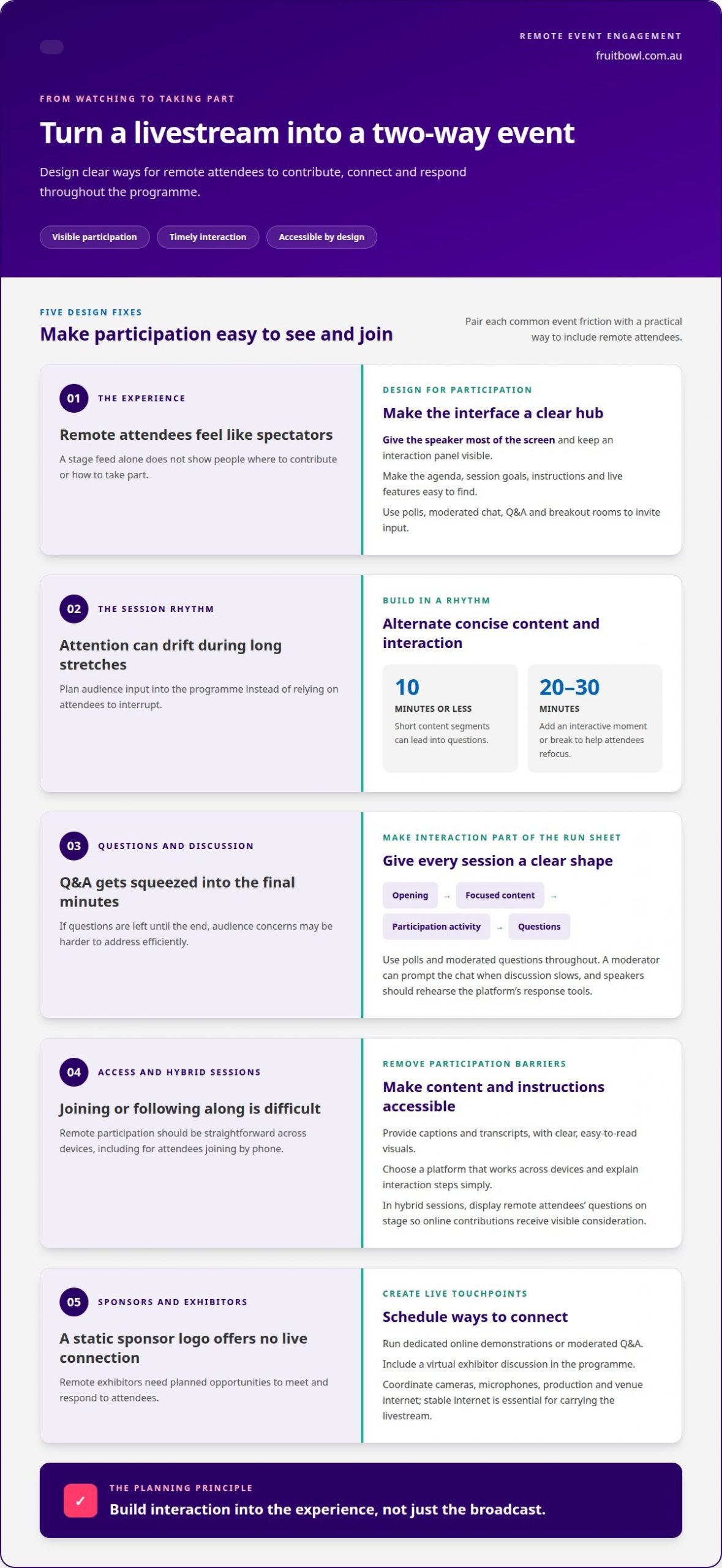
Make the event interface a clear hub for sessions, streaming and audience participation. Give the speaker most of the screen and reserve a visible panel for interaction. Keep the agenda, session goals, instructions and live features easy to find, so remote attendees know where to look and how to contribute.
Polls, moderated chat, Q&A and breakout rooms are effective tools for remote events. Use a poll to gather opinions, Q&A to put audience questions to speakers, and breakout rooms for small-group discussion. To maintain attention, alternate concise presentations with audience input. Short content segments of 10 minutes or less can lead into questions, while an interactive moment or break every 20-30 minutes gives attendees a reason to refocus.
Build the run sheet around transitions, not just speaker timings. Give each session a clear opening, focused content, a participation activity and time for questions. Don’t leave Q&A until the final few minutes: polls and moderated questions can help speakers address audience concerns efficiently. A moderator can prompt the chat when discussion slows, and speakers should rehearse using the platform’s response tools.
For Australian audiences, improve access with captions, transcripts and clear, easy-to-read visuals. Use a platform that works across devices, and make interaction instructions straightforward for attendees joining by phone or computer. In hybrid sessions, display remote attendees’ questions on stage so online contributions receive visible consideration alongside in-room participation.
Remote sponsors and exhibitors also need a live way to connect. Schedule dedicated online demonstrations, moderated Q&A or a virtual exhibitor discussion, rather than relying on a static sponsor logo. For streaming, coordinate the cameras, microphones, production team and venue internet; stable internet capable of carrying the live stream is essential. Browser-based event platforms available to Australian organisers vary in features and pricing. Costs depend on licensing, attendee capacity, streaming requirements and engagement tools, so compare the platform needs against the run sheet.
2. Event hashtags and attendee networking
An event hashtag gives attendees a shared label for posts, questions and observations. Promote it in registration emails, opening slides and speaker introductions, then use it consistently across social channels such as LinkedIn and Instagram. A prompt such as “share one idea you’ll take away” gives people a clear reason to post and can extend the online discussion beyond the session.
Networking works best when the format gives people a simple way to begin. For a virtual discussion, place 4-10 attendees in a small group for a set period, then rotate allocations so they meet new people. Speed networking offers another structure: schedule one-to-one conversations lasting 3-5 minutes each. Provide a topic or opening prompt, such as “What challenge brought you to this session?”, to move quickly from introductions into useful conversation.
Offer low-pressure ways to contribute before inviting attendees to speak aloud. They could post a short chat response, submit a question privately or discuss a prompt in a breakout room. A moderator can acknowledge contributions and invite follow-up without putting anyone on the spot. Pairing attendees before the event can also give each person a familiar contact during networking.
For a hybrid event, make remote connection part of the schedule rather than an optional add-on. A virtual lobby can host informal conversation during breaks, while a virtual-only fireside chat after a presentation gives online attendees a dedicated opportunity to question the speaker. Recognition can also bring people into the discussion: acknowledge useful insights or present an award for a contribution that advances the event theme. A considered hybrid event plan can coordinate these online touchpoints with the wider programme.
3. Gamification and participation rewards
Gamification gives participants a reason to take part, rather than simply watch. Start with the event objective, then reward actions that support it. For a conference focused on exhibitor engagement, for example, award points for visiting virtual booths, viewing demonstrations or submitting relevant questions. Connecting game elements to practical outcomes gives exhibitors a clearer role in virtual events.
A leaderboard can show points for completed activities, quiz answers or thoughtful contributions. Keep the scoring rules visible and progress easy to follow. To avoid making participation feel like a race, recognise different contributions, such as a team effort or a useful question. Digital recognition or an event-related prize can suit the audience and the event’s purpose.
Quizzes, virtual scavenger hunts and digital escape rooms are practical ways to involve attendees. A quiz can revisit conference themes, while a scavenger hunt might ask people to find information across exhibitor pages. Remote teams can use intranet platforms for trivia or escape-room activities. Polls can also become part of a game when responses contribute to a shared challenge or reveal how the group is thinking.
Measure engagement against the intended outcome. Attendance rate compares attendees with registrations, while average watch time can indicate interest in the content. Poll responses, chat messages, breakout-room participation, downloads and shares reveal different types of activity. Post-event feedback, including Net Promoter Score, can help assess sentiment. Consider these measures together: a high view count alone doesn’t show whether people interacted or found value.
After the event, compare activity data with your original objective. If booth visits were the goal, review exhibitor interactions. If learning mattered, examine quiz responses and feedback. This makes gamification a planning tool, rather than a technical feature added to the programme.
4. Differences between engaging online and onsite audiences
Onsite audiences share a physical room, where eye contact, applause and informal conversation signal interest. Remote attendees don’t have those cues, so silence on screen doesn’t necessarily mean disengagement. Online participation needs clear prompts and visible ways to respond; people in the room can often react spontaneously to a presentation or speaker.
Livestreams also introduce a timing difference. Online viewers may experience a video-player delay of 30 seconds to two minutes, so a question asked in the room might reach them later. Allow time for this lag, have a moderator relay remote questions, and avoid expecting online and onsite responses simultaneously.
Common mistakes include treating the stream as a passive broadcast, overlooking remote questions and relying on spontaneous interaction. Prevent them by assigning a moderator to monitor the online channel, explaining how to contribute and building specific participation moments into the run sheet.
Plan for the needs of both audiences. Display remote questions on a screen in the venue, and give online viewers a clear view of speakers and presentation materials. Schedule breaks for both groups, but use online breaks to share a prompt or offer a virtual discussion space. This gives remote attendees a chance to connect instead of simply waiting for the stream to resume.
Use audience feedback to assess whether each format worked. Compare online questions and chat contributions with in-room responses, then review attendee feedback after the event. If remote participation was low, examine the timing, visibility and ease of each interaction before changing the format. Plan an event with Fruitbowl Events Agency to coordinate online and onsite experiences around your programme.
Displaying virtual attendees’ questions on stage can help include them and give their contributions visibility alongside those from the room. Keep content segments short and allow time for interaction between speakers and audiences.
Organisations can also use intranet platforms to host virtual scavenger hunts, online trivia contests, and digital escape rooms for remote teams.
Fruitbowl Events Agency
Fruitbowl Events Agency can incorporate audience engagement into the wider event plan, aligning interactive moments with the programme, production requirements and attendee experience. For corporate events, conferences and seminars, festivals and public events, and government activations, that means coordinating planning and logistics around how remote and onsite audiences will participate.
Bring in an experienced event team when you need the run sheet, speakers, streaming and audience interaction to work together. Fruitbowl Events Agency provides end-to-end event management, from strategic planning to delivery, guided by the event’s objectives.
Contact Fruitbowl Events Agency to discuss your event and its audience engagement needs.
Make participation part of the event’s purpose
Start by deciding what you want attendees to take away: a new connection, a clearer understanding or a stronger relationship with your organisation. That intention can guide the experience from the first invitation to the final interaction. Engaging a remote event audience means treating participation as part of the event’s purpose, not an extra feature added at the end. For teams aiming to weave genuine community and shared values into their virtual or hybrid sessions, consulting and workshop specialists at cultureofbelonging.org provide insights on embedding a culture of connection.
Fruitbowl Events Agency can shape this experience across corporate events, festivals and public events, and conferences and seminars. With your objectives in view, planning can align the programme, production and audience experience for online and onsite attendees.
Ready to plan your next event? Contact Fruitbowl Events Agency to discuss how audience participation can support your objectives. A clear purpose gives every interaction somewhere meaningful to lead.
Frequently Asked Questions
Any tips on the effective communication plan?
Build the communication plan around what attendees need to know before, during and after the event. Share the purpose, access instructions and participation expectations in advance, then use reminders to direct people to the next relevant step. For online events, plan attendee communications around the event and send them when they are most useful. After the event, follow up with key resources and a clear way to provide feedback.
What about facilitation?
Good facilitation keeps an event focused and makes it easier for attendees to contribute. A facilitator can explain transitions, manage speaker handovers, monitor timing and clarify how participants can raise an issue. In a panel, for example, they can connect related comments and invite a quieter panellist to add context. A short briefing beforehand helps the facilitator and speakers align on roles and session priorities. When planning internal workshops and team forums, working with leadership consultancies like Humanise Solutions can also help equip facilitators with the skills needed to foster team excellence.
What are the best ways to engage a remote event audience?
One practical way to engage a remote event audience is to offer choices that suit different participation styles. Invite attendees who want to speak to contribute live, while giving those who prefer time to reflect a written option. Make session materials easy to revisit, then share recordings or resources after the event. This extends the value beyond the livestream and gives attendees another way to engage with the ideas.
What are the best practices for moderating chat and audience questions at a remote event?
Set clear expectations for the chat at the start, including how questions will be selected and when attendees can expect a response. A moderator can group similar questions, remove irrelevant comments and flag urgent technical issues to the production team without interrupting the speaker. Keep a record of unanswered questions and arrange appropriate follow-up, so attendees know their contributions have been acknowledged.
OUR BLOG
Event Insights & Expertise
Our blog is your go-to resource for all things events. From expert insights and the latest industry trends to practical planning tips, we share everything you need to deliver standout experiences.
Contact Us