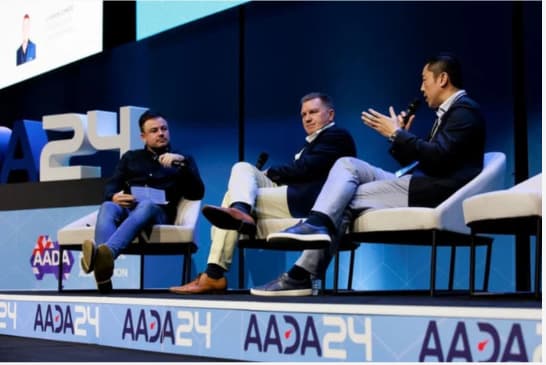
A conference can be live streamed from many Australian venues, but venue access and internet reliability shape what’s possible. Conference live streaming services need space for cameras and microphones, a clear audio feed and a tested connection. The production plan should also account for captions and stream access.
A smooth viewing experience should not disrupt the event in the room. Achieving both takes more than a camera: sound, camera coverage, audience access and the venue’s technical conditions all need to work together.
This guide explains what to plan for at your venue, how captions and sound affect the stream, and how to manage registration and access for different audiences. It also outlines the checks that support a reliable broadcast and the factors that shape corporate pricing, so you can scope the production around your event rather than rely on a one-size-fits-all package.
Key Takeaways
- Plan camera positions, captions and sound together so remote viewers can follow both the speakers and the room.
- Match registration and platform access settings to your audience, especially when conference discussions are sensitive.
- Build in a pre-event stream test to identify technical issues and assess the venue’s internet reliability.
- Scope corporate streaming costs around the production requirements and venue conditions, rather than relying on a one-size-fits-all price.
Captions, camera angles, and sound quality
Plan captions, camera positions and audio as one production task. The venue layout, stage lighting and session format determine what cameras can capture clearly.
Captions and sound quality
Captions help remote attendees follow spoken content, while a clean audio feed makes each session easier to understand. Decide how captions will be prepared and displayed, then include them in the stream test. Identify the speaker microphones and the audio feed sent to the broadcast, since room speakers alone may not provide clear stream audio. Test presentations and audience questions, not just an empty stage.
Some corporate livestream packages include basic audio for the in-room audience, but that does not describe every production setup. Confirm how speaker voices and audience contributions will reach online viewers. For example, a question from the floor may need a microphone to be heard on stream.
Multi-camera production and live switching
Which Australian conference streaming services support multi-camera production and live switching? Look for a production service that provides broadcast cameras, camera operators and vision switching. Some corporate live-stream packages include two cameras, letting the production switch between a speaker view and a wider stage shot.
Operators frame each shot while a vision switcher selects the live feed. This helps the broadcast follow a presenter, panel or slide change without leaving viewers with an unsuitable angle. Position cameras with sightlines, audience movement and stage access in mind, so equipment does not obstruct attendees or capture distracting activity.
Match video resolution to the streaming platform and the venue’s available connection. The camera and lighting setup should account for stage brightness, screen reflections and presenter movement. A camera test from the planned position can show whether faces, slides and transitions remain legible.
For Australian events, treat privacy, consent, copyright and recording as separate production decisions. Obtain consent from people who will be identifiable, secure permission for music and presentation materials, and tell attendees when recording is taking place. Decide who can access the stream and recording, and how each will be used, such as adapting keynote sessions into episodic video podcasts—a format supported by dedicated production specialists like podcastzurich.com. These steps clarify rights and audience expectations before broadcast.
Platform access, registration and audience control
In Australia, conference streams can be delivered through a platform, website or social media channel. The right setup depends on audience access, engagement needs and the security the event requires.
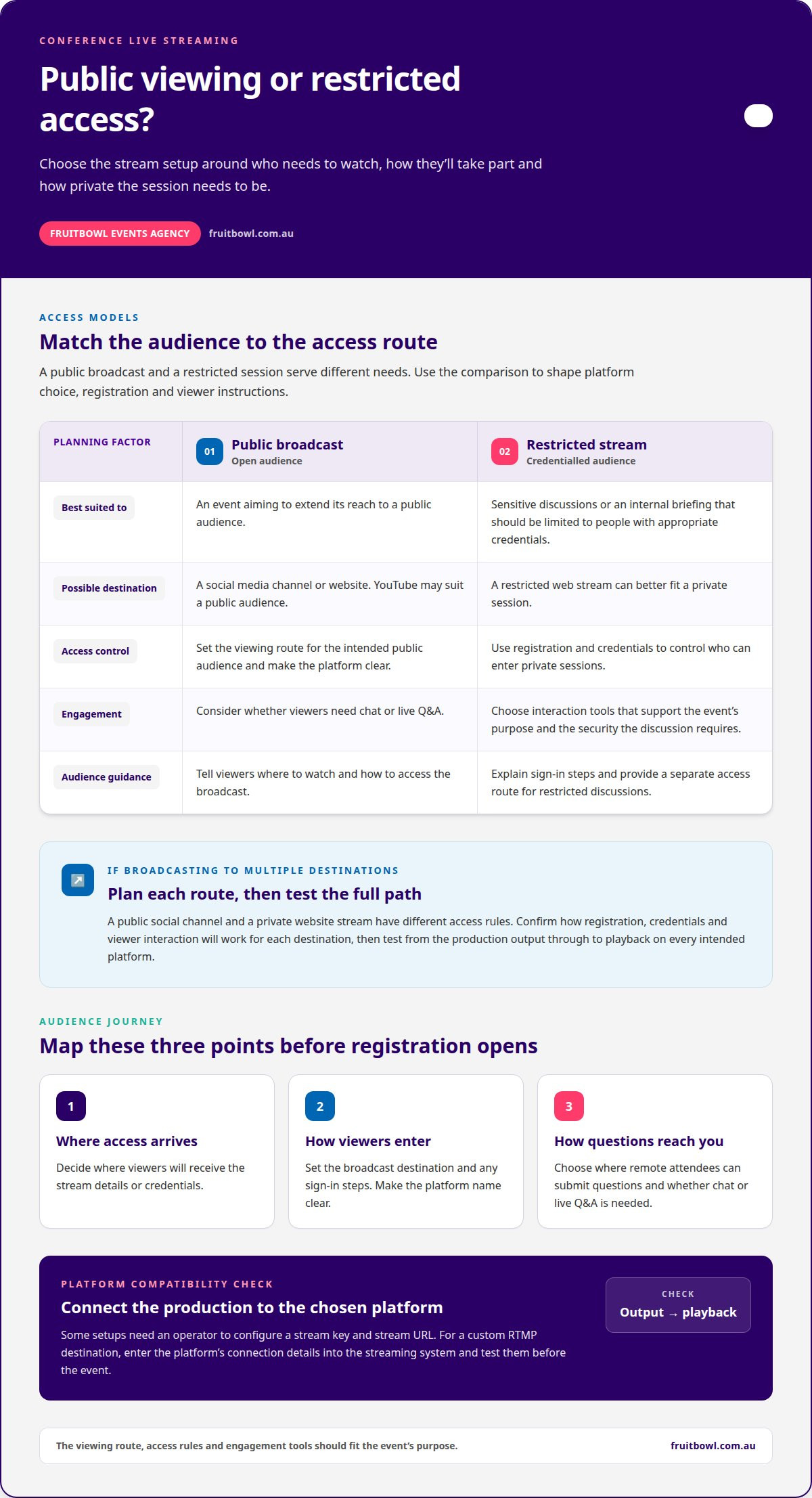
For corporate events, distinguish public viewing from restricted sessions. Limit sensitive discussions to people with appropriate credentials.
Live-streaming platform selection
What conference live streaming services are available in Australia? Event productions can stream to social media or a website, with access tailored to the audience. Choose a platform by considering who needs to watch, whether viewers need chat or live Q&A, and what security controls the discussion requires.
A public broadcast can extend an event’s reach, while registration and credentials help control access to private sessions. A platform such as YouTube may suit a public audience; a restricted web stream may better fit an internal briefing. Make sure the viewing experience and engagement tools support the event’s purpose.
Platform compatibility
Compatibility depends on how the production connects to the chosen platform. Some setups require the operator to configure a stream key and stream URL before broadcasting. For a custom RTMP destination, enter the platform’s connection details into the streaming system and test them before the event.
Plan simultaneous broadcasts around the selected destinations and each audience’s access rules. A public social channel and a private website stream serve different needs, so confirm how registration, credentials and viewer interaction will work across them. Test the full path, from the production output to playback on each intended platform.
Map the audience journey before registration opens: where viewers receive access, how they enter the broadcast and where they submit questions. Give remote attendees clear instructions, including the platform name and any sign-in steps. If the conference has public sessions and restricted discussions, organise separate access routes rather than relying on one open link.
For events that combine online participation with a broader corporate programme, planning a corporate event can bring the audience experience and streaming requirements into the same production plan.
Technical reliability and internet redundancy
Reliable streaming starts with venue access, a tested internet connection and a technical plan for the broadcast. For hybrid events in Australia, production needs to coordinate the room, remote presenters and streaming platforms.
To plan and set up a live-streamed conference, map the sessions and venue, confirm internet access, position equipment, connect the stream and test the complete programme. A technical rehearsal gives the operator time to identify faults before attendees join.
- Assess the venue. Confirm where cameras, lighting and production equipment can be placed, and identify power and internet access. Check that cable routes won’t obstruct audience movement or venue operations.
- Plan the connection. Discuss the venue’s internet arrangements with its technical team. Identify the primary connection and a practical backup route, then decide how production will respond if the main connection fails.
- Rehearse the broadcast. Test the stream on the selected platform, including transitions between sessions, remote contributors and any recorded footage. Check sound and picture at the viewing end, not only on the production monitor.
- Assign support roles. Establish who monitors the stream, who communicates with venue staff and who troubleshoots presenter or platform issues. Clear responsibilities help the team act promptly when a fault appears.
A rehearsal should follow the event’s running order. For example, test a presenter’s microphone, a slide change and a remote speaker joining from another location. This can reveal issues a simple connection test misses, such as an incorrect input or an unexpected platform prompt.
Internet redundancy means planning an alternative connection, not assuming the venue’s usual network can carry every part of the production. The right arrangement depends on the venue and streaming setup. Confirm how the team will switch to the backup route, and keep platform access details available to the operator.
On-site technical support can monitor the broadcast, troubleshoot signal or equipment problems, and coordinate with venue staff. Agree who makes production decisions during a disruption, how presenters receive instructions, and how the team will handle a pause or restart. Clear roles help keep the response orderly while protecting the live event.
Corporate live-stream pricing
Corporate live-stream pricing depends on production scope, not simply the number of hours on air. The price depends on the project and is provided after a quote request. Key factors include venue access, equipment, crew, programme length and delivery requirements.
Start with the event brief. A single-stage presentation has different production needs from a hybrid conference with presenters in the room and remotely. The number of sessions, room changes and audience participation requirements all affect the work involved in planning and managing the broadcast.
Production scope can include camera and audio equipment, operators, vision switching, lighting, captions, platform setup and technical support. Include each element to meet a practical need. For example, additional camera coverage may support panel discussions, while a custom streaming destination may need configuration and testing.
Venue conditions also shape the estimate. The production team may need to account for equipment access, room layout, available infrastructure and setup requirements. A venue with multiple session spaces can require more coordination than a single-room programme. Clear venue information helps define the work before delivery.
To make a quote useful, set out the event format and what the remote audience needs to experience. Include:
- the schedule, session locations and any room changes
- the expected camera coverage and speaker formats
- the chosen platform, access approach and any simultaneous broadcasts
- caption, recording and audience engagement requirements
- venue details that affect equipment access or production setup
This breakdown helps distinguish essential production elements from optional enhancements. For instance, a stream for internal viewing may need different audience controls from a public broadcast designed to engage a wider audience. Matching the scope to the event avoids including features that do not serve its purpose.
For a tailored estimate, request a corporate event quote with your programme, venue and streaming requirements. A considered brief gives the production team a clear basis for scoping the work.
Fruitbowl Events Agency: Conferences & Seminars
Fruitbowl Events Agency manages Conferences & Seminars, bringing event planning, logistics and on-site delivery into one coordinated process. Turn to the team when your conference needs a clear programme and venue plan, as well as decisions about streaming access, audience experience and production requirements.
Streaming choices affect more than the broadcast. They need to fit the event schedule, room layout and needs of in-person and remote attendees. Fruitbowl Events Agency can coordinate the wider conference, keeping planning and delivery aligned while incorporating streaming requirements into the brief.
To discuss your conference plans, contact Fruitbowl Events Agency.
Shape the stream around your event
Your next decision is what remote attendees should be able to see, hear and take part in. Define that experience before setting the production scope. This gives your team a practical basis for briefing stakeholders, aligning the event programme and deciding which streaming features matter most.
Choosing conference live streaming services is part of a broader event plan. Fruitbowl Events Agency supports Conferences & Seminars, Corporate Events and Festivals & Public Events, shaping event planning and delivery around each occasion’s purpose. A clear brief connects the audience experience with the wider event objectives.
Bring your programme, venue details and intended audience together as the starting point for planning. Contact Fruitbowl Events Agency to discuss your event and its requirements. A considered plan can help you move forward with clarity.
Frequently Asked Questions
Can you live stream my event at any venue?
A live stream can be planned around a venue’s practical conditions. Production access, room layout, power and internet arrangements all influence the setup and broadcast plan. For example, a multi-room conference may need a different production layout from a single-stage seminar. Venue details help establish how the event can be delivered and which technical arrangements belong in the production plan.
Do you do hybrid events?
Yes, Fruitbowl Events Agency offers virtual and hybrid events, including live streaming, broadcast production, remote speakers and platform management. A hybrid format can connect in-person sessions with remote presenters or viewers in one event programme. Planning can account for how online participation fits the schedule, how remote speakers contribute and how the platform supports the intended audience experience.
How much does corporate live streaming cost in Australia?
Corporate live-streaming costs are scoped to the event rather than set as a standard amount. The quote reflects production and event-management requirements, such as programme format, venue conditions, technical direction and coordination. A brief outlining the schedule, audience experience and streaming needs gives the team a basis for preparing a project-specific quote. No single price represents every corporate event.
What equipment do you use?
Fruitbowl’s in-house AV production includes staging, lighting, sound, vision, LED screens and technical direction. The equipment plan is built around the event format and creative requirements, rather than assuming every conference needs the same setup. For instance, a presentation with large-format visuals may need a different screen plan from a seminar focused on discussion. The production brief guides those decisions.
What happens if there’s a technical issue during the event?
Technical issues are handled as part of the event’s production response. The team can use technical direction to assess how an issue affects the programme and coordinate the next production decision. For example, a problem with presentation visuals may require a different response from an interruption to a remote speaker. Clear roles and a planned running order help the event team manage changes methodically.
What if my event requires specific equipment or setup?
Specific equipment and setup requirements can be included in the event production plan. Share details such as presentation formats, stage requirements, visual content and how speakers will participate, so technical direction can align production with the intended experience. A detailed brief also helps coordinate AV with the wider programme, venue arrangements and audience needs, rather than treating equipment as a separate decision.
OUR BLOG
Event Insights & Expertise
Our blog is your go-to resource for all things events. From expert insights and the latest industry trends to practical planning tips, we share everything you need to deliver standout experiences.
Contact Us